
Welcome to PocketPaw
PocketPaw is a self-hosted AI agent that runs on your machine and connects to Telegram, Discord, Slack, WhatsApp, Signal, Matrix, Microsoft Teams, Google Chat, and a built-in web dashboard. It gives you full control over your AI assistant with zero cloud lock-in.
What is PocketPaw?
PocketPaw is an event-driven AI agent framework that bridges multiple messaging platforms to powerful language model backends. Send a message from any channel, and PocketPaw processes it through a configurable agent pipeline that can:
- Execute code on your machine via shell commands
- Read and write files on your local filesystem
- Browse the web with Playwright-based automation
- Search the internet via Tavily or Brave Search
- Generate images with Google’s Gemini models
- Manage your email through Gmail integration
- Control your calendar via Google Calendar
- Play music with Spotify integration
- And much more via 30+ built-in tools
Key Features
Multi-Channel
Connect 9+ messaging platforms simultaneously. Manage all channels from the web dashboard.
3 Agent Backends
Claude Agent SDK, PocketPaw Native, or Open Interpreter. Pick the engine that suits your needs.
30+ Tools
Web search, image gen, voice, browser, OCR, research, delegation, and custom tool support.
Security First
Guardian AI safety checks, injection scanning, audit logs, and automated security audits.
How It Works
Install PocketPaw
Install via pip or uv with the extras you need. Core installation is lightweight (~10 packages).
Configure your channels
Add your bot tokens and API keys. The web dashboard makes configuration easy.
Start chatting
Send messages from any connected channel. PocketPaw processes them through the agent pipeline.
Extend with tools
Add integrations, MCP servers, and custom tools to make your agent more capable.
Architecture at a Glance
PocketPaw follows an event-driven message bus architecture:
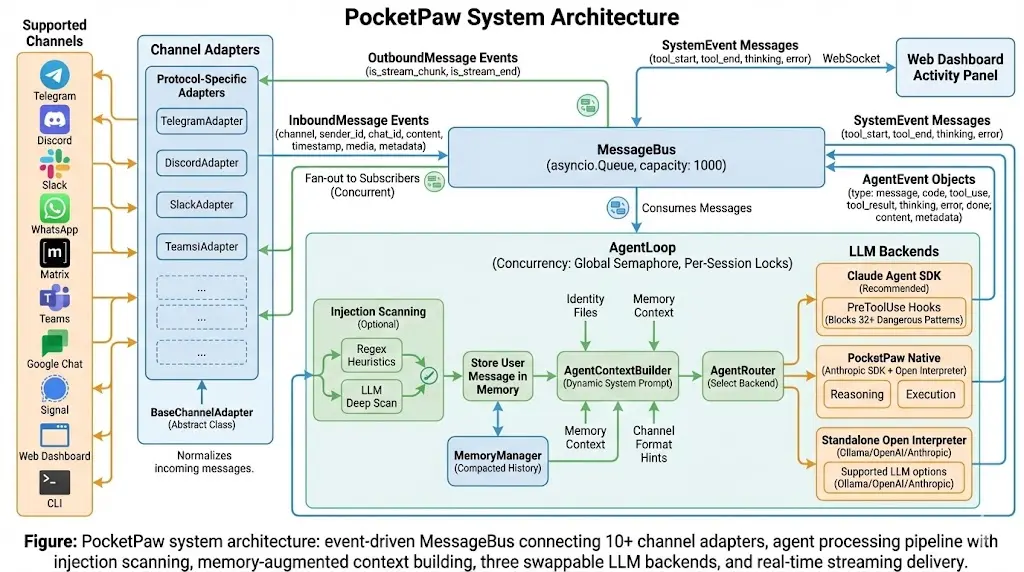
Every message flows through the bus, regardless of which channel it comes from. This makes it trivial to add new channels and ensures consistent behavior across all platforms.
Next Steps
Installation
Get PocketPaw running on your machine in under 5 minutes.
Quick Start
Set up your first channel and start chatting with your agent.
Why PocketPaw?
Learn what makes PocketPaw different from other AI assistants.